






Table of Contents
Clear audio can make a big difference to video quality. But getting clean, natural-sounding audio isn’t simply about buying a better microphone. Your recording environment, microphone placement, and recording style all affect the final result.
A quiet home office, a busy café, and an outdoor location can create completely different audio challenges. Instead of using the same setup everywhere, choose your microphone based on where you record, what you’re recording, and how much you move.

Start with Your Recording Environment
Before choosing a microphone, identify the main sources of noise around you.
Home offices, bedrooms, and studios are generally easier to record in, but they’re not always completely quiet. Common sounds include:
· Computer fans
· Air conditioning
· Keyboard and mouse clicks
· Room echo
· Background conversations
For stationary recording, a desktop or USB microphone is often a practical choice because you can keep it positioned close to you throughout the recording.
The NEEWER UM01 is a USB condenser microphone designed for desktop recording. Its cardioid pickup pattern focuses on sound from the front while helping reduce sound from the sides.
It also features AI noise cancellation to help reduce common desktop sounds such as keyboard clicks, computer fans, air conditioners, and nearby conversations. A 3.5mm headphone output provides real-time monitoring, while separate microphone gain and headphone volume controls make it easier to adjust your setup.
Cafés, classrooms, events, and shared workspaces are more difficult because background noise can come from multiple directions.
In these situations, microphone distance becomes especially important. Keeping the microphone close to the speaker helps capture more direct voice audio, while sounds farther away become relatively less prominent.
Noise cancellation can provide additional help when the environment cannot be completely controlled.
Outdoor recording introduces even more variables, including:
· Traffic
· Wind
· People talking
· Construction
· Street noise
For mobile outdoor content, a wireless lavalier microphone with noise cancellation and wind protection can be a practical solution.

Choose a Microphone Based on How You Record
Your recording style is just as important as your environment.
Stay in One Place: Desktop Microphone
If you normally sit at a desk while recording, a desktop microphone can work well for:
· Streaming
· Podcasts
· YouTube videos
· Tutorials
· Online teaching
· Voiceovers
· Video calls
A desktop microphone keeps the setup simple and makes it easy to monitor your audio while recording.
Move Around: Wireless Lavalier Microphone
If you frequently move around, a wireless lavalier microphone gives you more freedom while keeping the microphone close to your voice.
It’s useful for:
· Vlogging
· Talking-head videos
· Interviews
· Product demonstrations
· Presentations
· Short-form videos
· Outdoor content
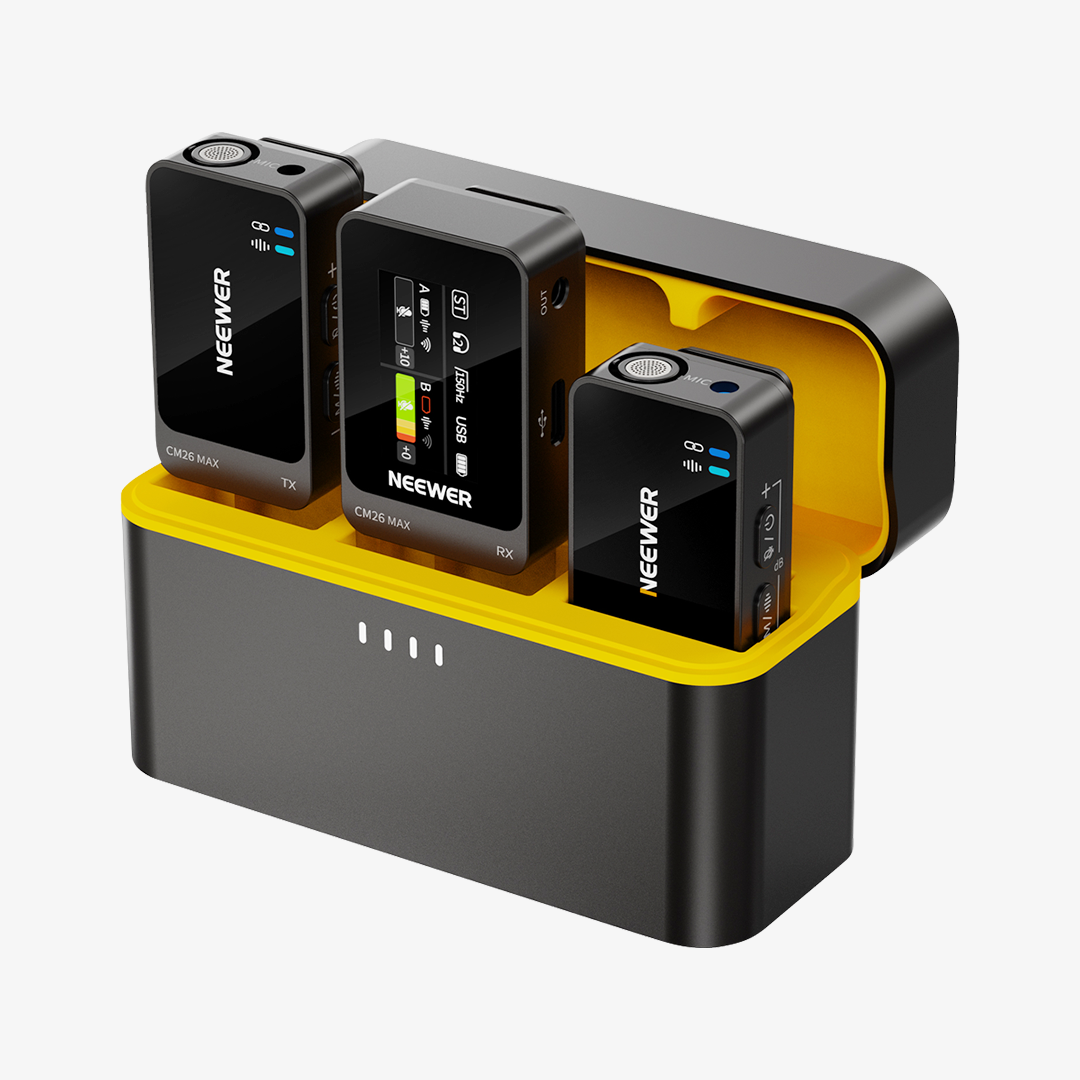
The NEEWER CM26 MAX is designed for this type of flexible recording. Its wireless design lets you move away from the recording device, while the USB-C receiver connects directly to compatible devices without requiring Bluetooth pairing.
It also features two levels of AI noise cancellation. A1 mode is designed for indoor environments with moderate background noise, while A2 mode is intended for noisier outdoor conditions such as traffic, wind, and street noise.
The key is to choose the setting that matches your environment rather than automatically using the strongest noise cancellation.

How Can You Reduce Background Noise When Recording?
You don’t always need to eliminate every background sound. The goal is to make the speaker’s voice clear while keeping distracting noise under control.
Start with these simple adjustments:
1. Move the microphone closer to the speaker.
2. Choose a quieter location when possible.
3. Keep the microphone away from obvious noise sources.
4. Reduce room reflections indoors.
5. Use wind protection outdoors.
6. Choose an appropriate noise cancellation level.
7. Monitor your audio before recording.
How to Get Better Audio Indoors
Indoor recording gives you more control, but the room itself can affect the sound.
Hard surfaces such as bare walls, windows, and floors reflect sound. Too many reflections can make a voice recording sound distant or echoey.
You can reduce reflections by recording near softer surfaces such as:
· Curtains
· Rugs
· Sofas
· Bookshelves
· Other soft furnishings
You don’t necessarily need professional acoustic treatment for a basic home setup. Small changes to the recording space can already make a noticeable difference.
Microphone distance also affects how much room sound gets into your recording.
Keeping the microphone closer to the speaker helps capture more direct voice audio and can make the voice sound clearer and more present.
For a desktop setup, positioning the microphone consistently is especially useful. A boom arm can make this easier while also freeing up desk space.

Using a Boom Arm for a Desktop Setup
A desktop microphone can take up valuable workspace, especially if your desk also holds a monitor, keyboard, camera, lights, and other equipment.
A boom arm allows you to position the microphone closer to your mouth while keeping the base off the main working area.
The NEEWER MS002 combines a low-profile desktop base with a pneumatic and spring-loaded boom arm. It extends up to 30.2 inches horizontally and supports compatible equipment weighing up to 5.5 lb.
Its internal cable channel helps keep microphone cables organized, which can be useful for streaming, podcasts, online meetings, and voiceovers.
The arm supports common 1/4”, 3/8”, and 5/8” connections with the included adapters, making it compatible with a range of microphones and other equipment.
How to Get Better Audio Outdoors
Outdoor recording is harder to control because wind and background noise can change constantly.
Protect the Microphone From Wind
Wind can quickly overwhelm a microphone, especially in open areas.
A furry windshield can help reduce the impact of wind and make outdoor voice recordings easier to use.
The NEEWER CM26 MAX includes a furry windshield for outdoor recording, providing additional protection when wind is likely to affect the microphone.
Match Noise Cancellation to the Environment
Outdoor environments often contain several types of noise at once.
For the CM26 MAX:
· A1 mode: Indoor environments and moderate background noise
· A2 mode: Noisier outdoor environments such as traffic, wind, and street noise
Using the appropriate level can help reduce distracting background sounds without relying on maximum noise cancellation all the time.
It’s also worth monitoring your audio before starting a longer recording. If the voice sounds unnatural or overly processed, try a lower noise cancellation level.

Common Audio Problems and Quick Fixes
Sometimes the problem isn’t the microphone itself.
Move the microphone closer to the speaker and check the microphone gain. Avoid increasing gain too much if it introduces more background noise.
The room may have too many hard reflective surfaces. Try moving closer to curtains, sofas, rugs, or other soft furnishings.
First, check the microphone position. Moving it closer to the speaker can improve the voice-to-background ratio. If necessary, use an appropriate noise cancellation setting.
Use a furry windshield and avoid pointing the microphone directly into strong wind when possible.
If noise cancellation is making the voice sound unnatural, try a lower noise cancellation level. The strongest setting isn’t always the best setting.
Match Your Setup to Your Content
There isn’t one microphone that’s ideal for every type of recording.
|
Content Type |
Recommended Setup |
|
Streaming |
Desktop microphone |
|
Podcast |
Desktop microphone + boom arm |
|
YouTube |
Desktop or wireless microphone |
|
Talking Head |
Wireless lavalier |
|
Vlogging |
Wireless lavalier |
|
Interviews |
Wireless microphone |
|
Product Demo |
Wireless lavalier |
|
Outdoor Video |
Wireless mic + windshield |
|
Online Teaching |
Desktop microphone |
A simple rule of thumb:
Stay in one place → desktop microphone.
Move around → wireless lavalier.
Need more desk space → boom arm.
Recording outdoors → noise cancellation + wind protection.
FAQ
What type of microphone is best for YouTube videos?
It depends on your recording style. A desktop microphone works well for stationary videos, streaming, tutorials, and podcasts. A wireless lavalier microphone is more flexible for vlogs, interviews, talking-head videos, and moving shots.
How do I reduce background noise when recording?
Start by moving the microphone closer to the speaker and choosing a quieter location. You can also use noise cancellation when background noise cannot be completely avoided.
How do I reduce wind noise when recording outdoors?
Use a furry windshield or other wind protection designed for your microphone. When possible, avoid pointing the microphone directly into strong wind.
Should I always use the strongest noise cancellation?
No. Stronger noise cancellation isn’t necessarily better. Choose a level that reduces distracting background noise while keeping your voice sounding natural.
Is a desktop microphone better than a wireless microphone?
Neither is universally better. Desktop microphones are convenient for stationary recording, while wireless lavalier microphones are better suited to mobile content.
Do I need a boom arm for a desktop microphone?
Not always. A boom arm can free up desk space and make it easier to keep the microphone at a consistent distance from your mouth. It’s particularly useful for streaming, podcasts, voiceovers, and other desk-based content.
Final Takeaway
Clear audio isn't about using the same microphone for every situation. The right setup depends on where you're recording, how much you move, and the type of background noise you're dealing with.
Keep the microphone close to the speaker, control your recording environment when possible, and use tools such as noise cancellation or wind protection when the environment requires them.
Choose your microphone setup based on your content and recording environment—not just the microphone itself.





